
mybets.gg tested: 15 free AI scans, full analytics, no proof
mybets.gg reads your bet slip from a screenshot. It never touches your bookmaker account, so it works with any bookmaker in the world. What it cannot do is prove that anything in your record is true.
This mybets.gg review comes from a tested account. We used the free plan in Chrome on an Android phone, with four bets on 1xBet, in euros. We did not install the browser extension and we did not buy Pro, so the paid tiers stay unchecked here.

Pros
- Reads a bet slip from any bookmaker, with no account link.
- The free plan already shows ROI, drawdown and a calendar map.
- Void bets are logged at zero and stay out of the win rate.
- Our test scan read the odds and the stake correctly.
Cons
- Every result is typed in by hand, so the record proves nothing.
- ROI reads 1.3% on the dashboard and 1.00% on the analytics page.
- Football and Soccer are counted as two different sports.
- CSV export needs a paid plan.
How mybets.gg reads a bet slip
You need an account first. Nothing in the product works before you register.
After that the flow is short. You take a screenshot of your bet slip, open the Bet Upload page and drop the image into the capture zone. The AI reads it in a few seconds.
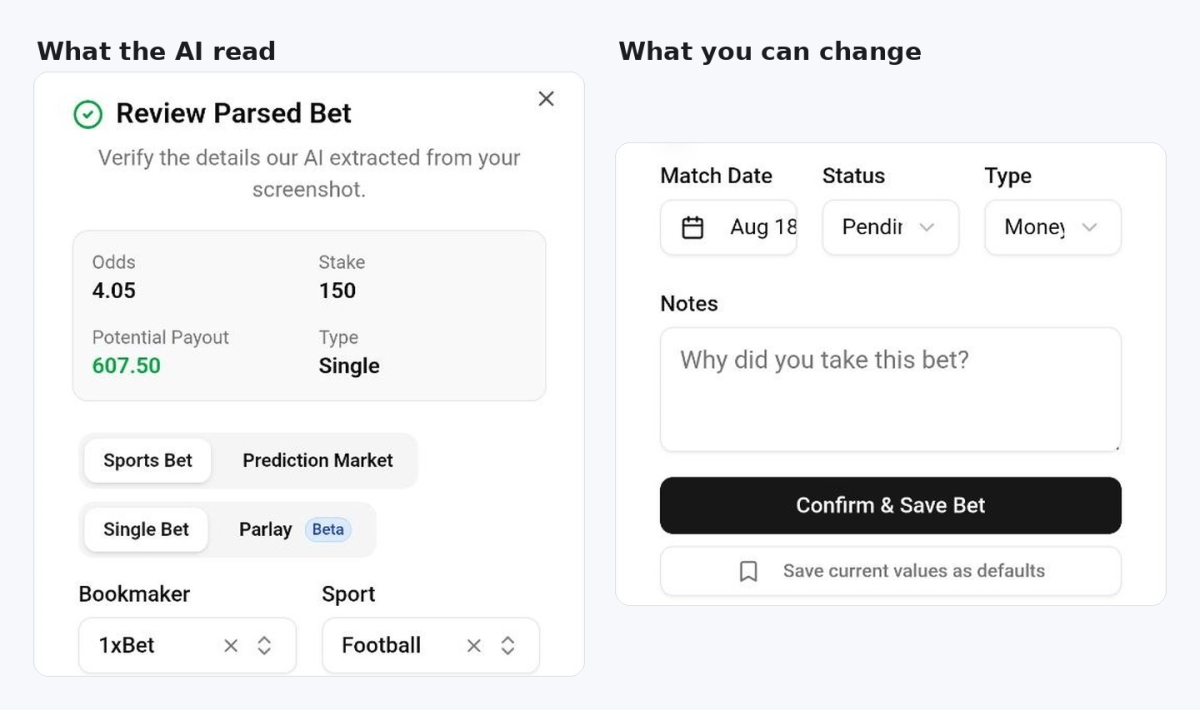
Our test slip came from 1xBet: a draw at 4.05 with a stake of 150. mybets.gg read both numbers correctly and showed the payout as 607.50. One clean scan is not a test of accuracy. It is still a better start than we had with Zort, where a scan saved the wrong odds.
Read the company's own wording with care. Its upload page offers to read a slip from any major sportsbook, and its extension page claims 99% accuracy on large ones. The product is sold for any bookmaker at all. A small local site with an unusual slip layout is the case those words leave out.
Then a window called Review Parsed Bet opens. Every field is editable: bookmaker, sport, event, selection, strategy, odds, stake, match date, status, bet type and a free notes box. There is also a toggle for free bets and a button that saves your current values as defaults.
Bulk import sits on the same page as a second tab. You screenshot a whole bet history page at your bookmaker, and the AI reads every row at once. That fills an empty record on day one. We did not test it. It runs on the same AI scans, so a large import should use up a month's allowance quickly.
Some trackers work the other way and connect to a sportsbook account. Those reach US and Canadian books only. In Europe that road is closed, so reading a screenshot is the only way to fill a log without typing.
The phone works, and the extension is only a shortcut
mybets.gg has no app in Google Play or the App Store. That does not keep you off your phone. The whole dashboard is a website, and the full scan flow runs inside mobile Chrome. Our four bets went in that way, with the scan counter ticking up on the same screen.
The browser extension saves one step, and only on a computer. You drag a box around the slip on the bookmaker site instead of taking a screenshot first. It runs in Chrome, Edge, Brave and Opera.
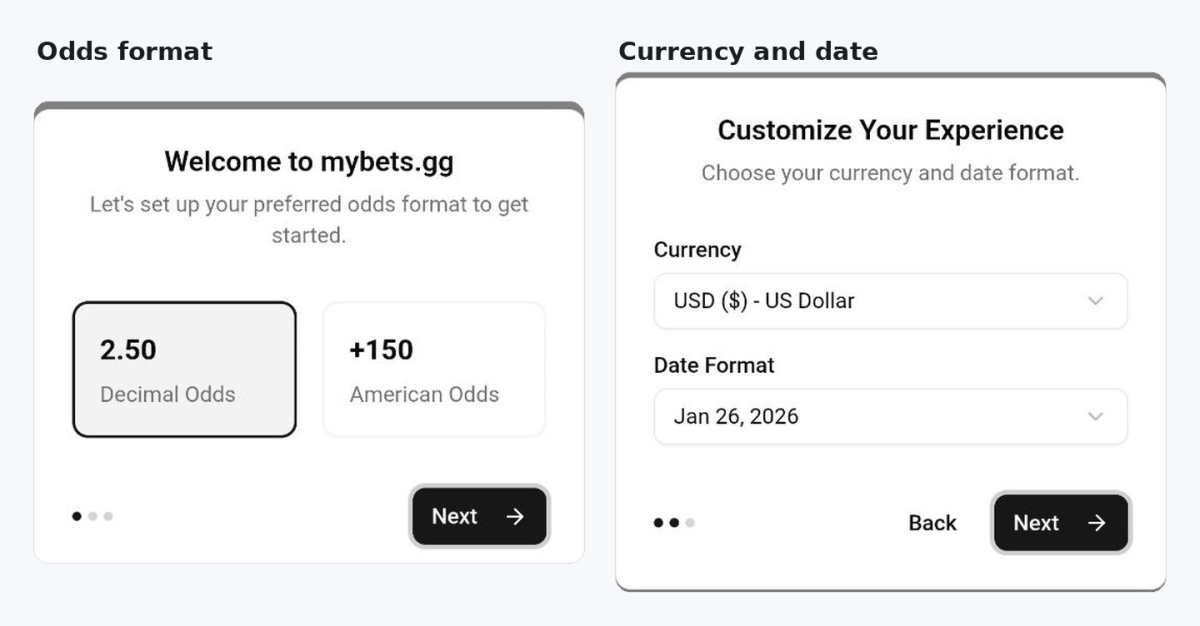
Set-up takes three short screens. You choose decimal or American odds, then your currency and date format. Decimal odds and euros are both there, so European bettors do not have to convert anything in their head.
You mark the result yourself, so nothing here is proof
Status is a dropdown in the save window, and it starts at Pending. You come back later and set the bet to Won or Lost by hand. mybets.gg does not read scores and does not settle anything for you.
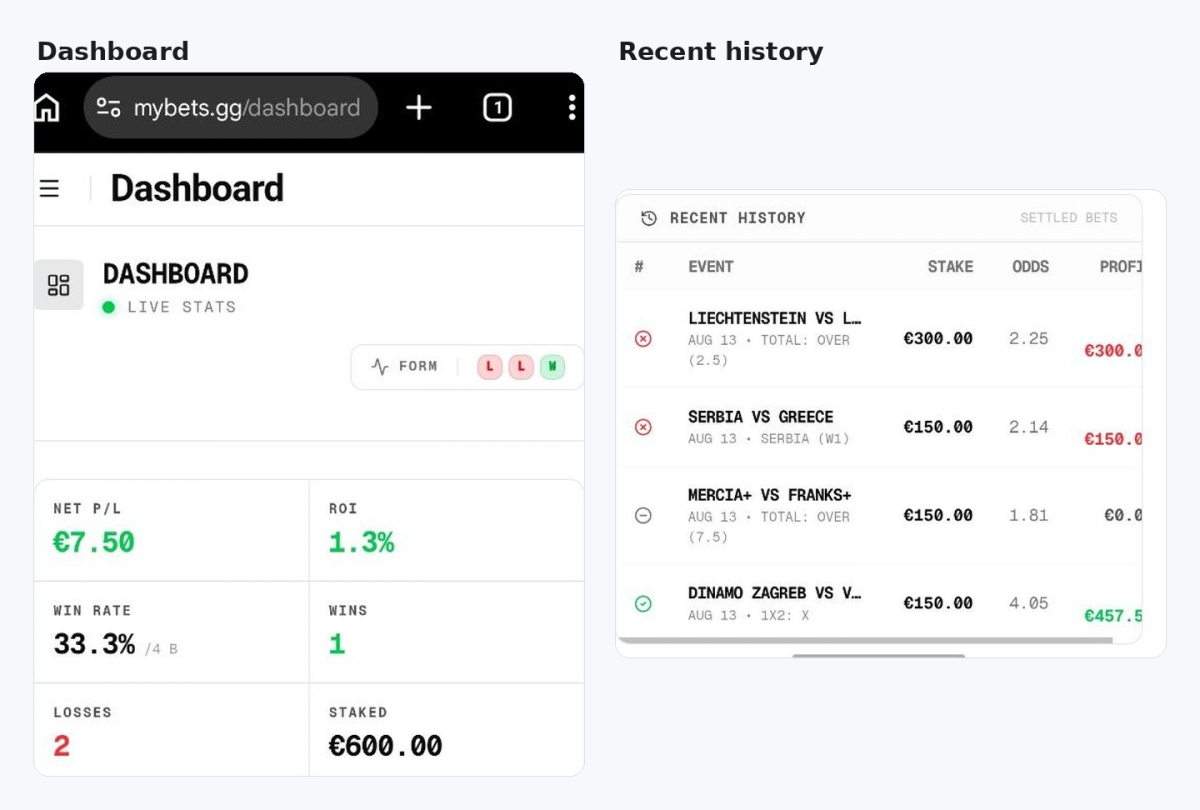
We pushed on this. One test bet was on a match five days in the future, and we marked it as Won anyway. The dashboard accepted it at once. Profit went up by 457.50 euros, the win rate moved, and the calendar painted that day green.
Most scanner-style trackers work this way, so this is not a fault of mybets.gg alone. The consequence still matters. Your record is a diary, not evidence. Nobody can use these numbers to prove a betting history, and neither can you.
Numbers that do not agree
A void bet is handled well. Our 150 euro bet at 1.81 was returned. mybets.gg logged it with zero profit and left it out of the win rate. Three settled bets, one winner, 33.3%. Zort files a cashed-out bet as still open, so its win rate drifts instead.
A few other things need a second look.
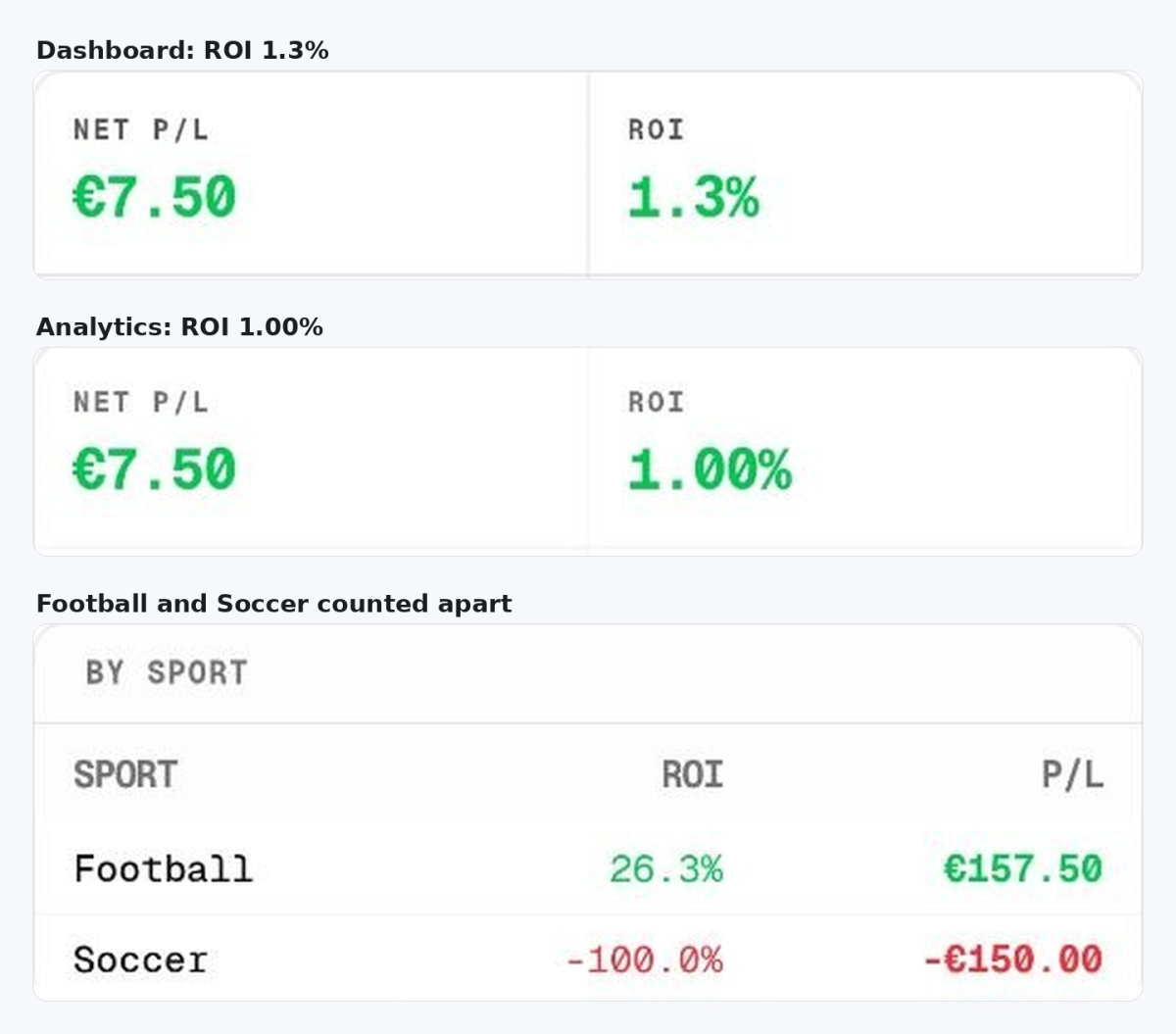
Our ROI reads 1.3% on the dashboard and 1.00% on the analytics page, on the same four bets. Profit was 7.50 euros on 600 euros staked, which is 1.25%, so the dashboard figure is the honest one. The analytics number fits a base of 750 euros instead of 600. That looks like the returned stake being counted twice, which makes the void bet the likely source of the gap.
Sport is worse. All four bets were football matches. The By Sport table splits them into «Football» at plus 26.3% and «Soccer» at minus 100%, as if they were different games.
That table has a second problem. The 157.50 euros of profit under Football comes from two bets with 450 euros staked, which is 35%. The table prints 26.3%, and 157.50 divided by 600 is 26.25%. Profit is counted for the sport, and ROI is counted against every bet you have. Any breakdown by sport is unusable until both are fixed.
Dates move around too. Recent History files the bets under the day we logged them. Daily Results and the calendar use the match date instead. Both are defensible, but you have to know which screen you are reading.
What the free plan gives, and what the paid page claims
The free plan gives 15 AI uploads a month, unlimited manual entry and one group vault. The pricing page calls the rest basic analytics.
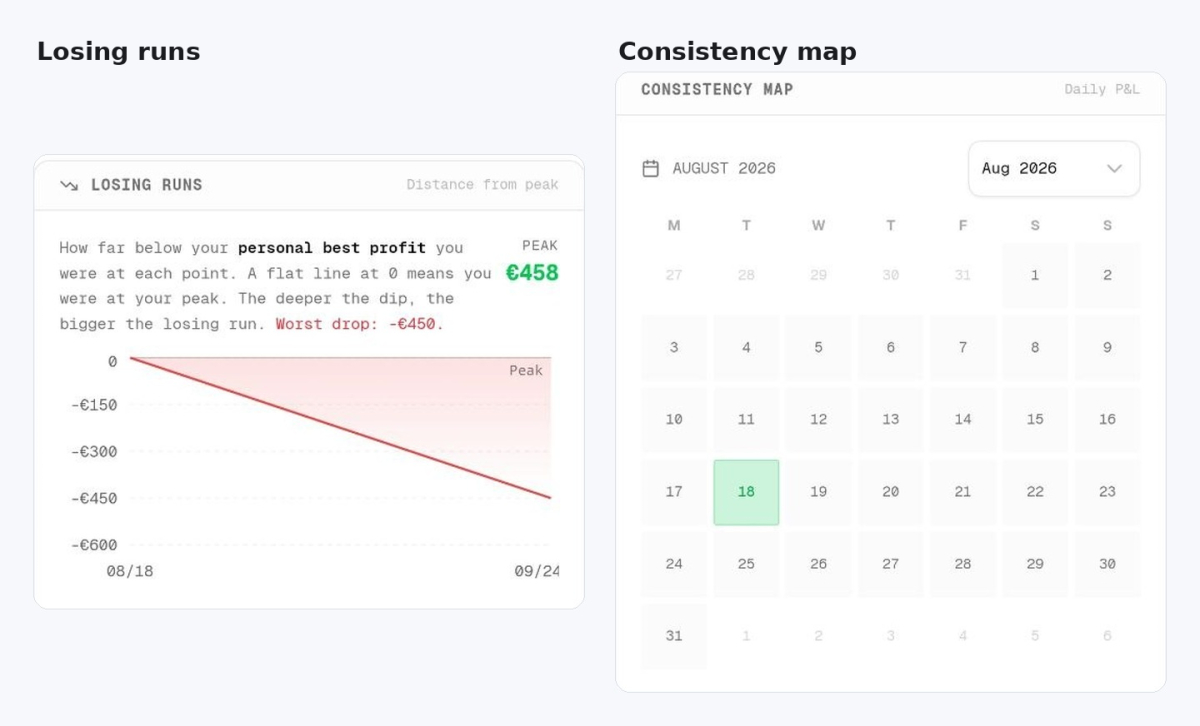
That last word is wrong. On a free account we could see net profit and loss, ROI, win rate, profit factor, biggest loss and average odds. Below them sat a running profit chart, daily results, a losing-runs chart and a calendar map of winning days. Breakdowns by strategy, bookmaker and sport were there too. The pricing page sells advanced analytics as a Pro feature. Most of what a normal bettor wants is already there for nothing.
15 scans is one bet every two days. Manual entry has no limit at all, so the free plan caps the speed of entry rather than the tracking.
Compare that with the buyer the company describes. Its store listing names bettors who place 20 or more bets a day. For that person, 15 scans a month is less than one day of betting.
mybets.gg pricing: Pro and Pro Plus
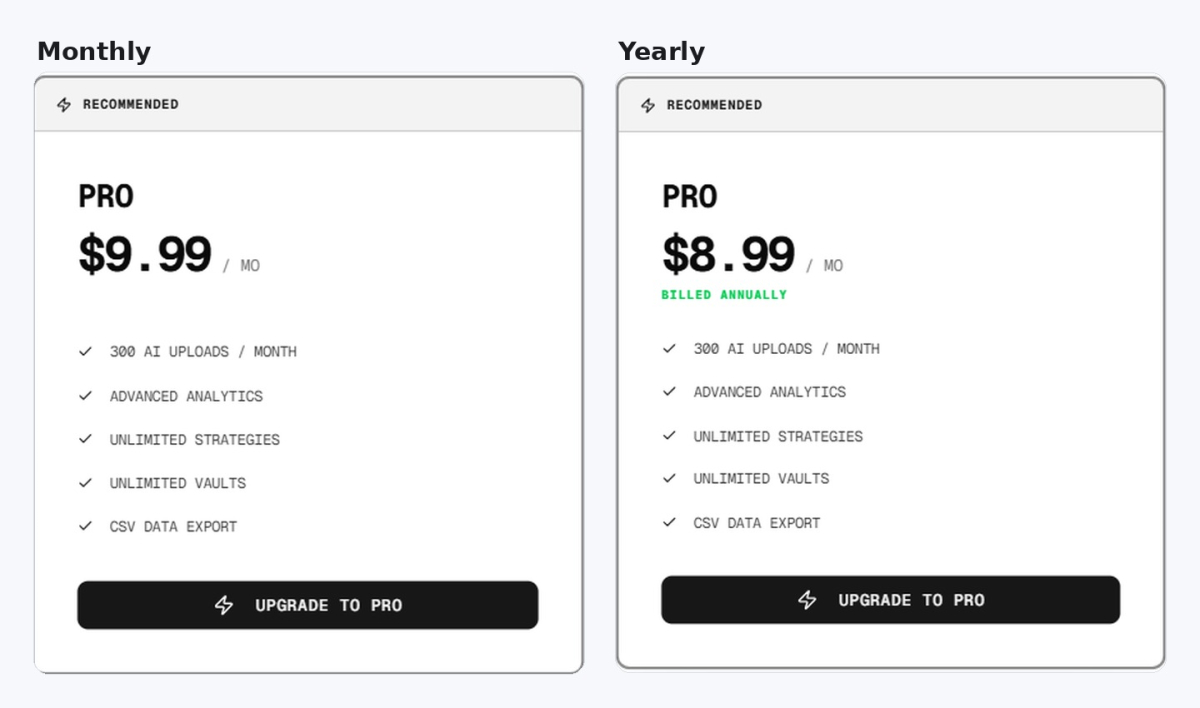
Pro costs $9.99 a month and raises the limit to 300 AI uploads. It adds unlimited strategies, unlimited vaults, CSV export and the advanced analytics label. Pro Plus costs $19.99 a month, removes the upload limit and adds priority support and beta features. Yearly billing drops the prices to $8.99 and $17.99, which is the promised 10%.
The pricing page marks Pro as recommended. Check that against the bettor it recommends Pro to. 300 uploads a month is 10 a day, and the store listing describes 20 bets a day. That bettor runs out in the middle of the month and needs the $19.99 plan.
For everyone else the free plan covers the tracking, and Pro is mostly a way to buy the export.
CSV export: your data can leave the app
Pro includes a CSV export of your full betting history. A CSV file is a simple table, and it opens in Excel or Google Sheets.
Zort, the other tracker we have used, fails here. It shows «Export Data» in its settings with a Pro badge. Its own upgrade screen then lists data export as a coming-soon feature. The file does not exist there on any plan. mybets.gg has it, and the price of it is a subscription.
If your record can leave the app, you can leave the app too. That matters more than most of the features on a front page.
Syndicates: a shared bankroll and a shared log
mybets.gg has a group feature. It calls the feature syndicates. You put money into a shared bankroll with people you trust. Members propose bets and vote on them, and the group results sit in one place. The free plan gives one group vault, and paid plans remove the limit.
The problem from the section above lands harder here. Results are typed in by a person, so a shared log shows what someone entered, not what happened at the bookmaker. We marked a future match as a winner in ten seconds, and a member of your group could do the same.
The money side is harder. A shared bankroll holds other people's cash as well as yours, and there is no contract behind it. If someone keeps the money, the app cannot help you get it back.
What happens to your screenshots
Every scan sends a picture of your bet slip to a server. mybets.gg answers that under its own pricing table. Screenshots are processed at once and never stored on its servers, the line says. The extension adds a second claim, that it only works when you click it and does not watch your browsing.
Its Chrome Web Store listing shows what the extension handles: personal information, financial and payment information, user activity and website content. The developer states that this data is not sold to third parties and is not used outside the product.
Both parts can be true at the same time. A tool that reads a bet slip needs to see the page, and a paid product needs payment details. Read the privacy policy before you install anything that can see your screen.
A new product with large claims
The Chrome Web Store page shows about 138 users and one rating. The version number is 1.0.4, and the last update was in March 2026.
The same page calls mybets.gg the number one automated bet tracker, and the only bet tracker with AI-powered OCR. OCR means optical character recognition, the technology that reads text from images. Neither claim survives a check, because phone scanners did the same job earlier and 138 users is not number one at anything.
The product's own set-up screen tells you to install the extension to sync bets automatically. Nothing syncs. The extension photographs your screen, which is a different thing. Sync belongs to trackers that connect to a sportsbook account.
BetMetrics OÜ runs mybets.gg. The company is registered in Estonia and publishes a street address and a phone number in the store listing. Many better-known trackers tell you less.
Closing line value is still a claim to test
mybets.gg lists closing line value among its analytics. Closing line value, or CLV, compares your price with the price at the start of the match. It shows whether your decision was good, and not only whether the bet won. Our closing line value guide explains it with examples.
We never saw a closing price appear next to a bet. An app that reads your slip sees your odds, not the market odds. The site never says where closing prices would come from. Treat CLV here as a feature to test, not as a reason to pay.
Who mybets.gg suits
mybets.gg suits a bettor in Europe or the CIS whose bookmaker no tracker supports. It reads the slip instead of the account, so bet365, Betano, Unibet, Pinnacle and 1xBet all work the same way. Exchanges, crypto sportsbooks and DFS apps work too. There is no list of supported sites to check, because there is no list.
It also suits anyone who wants real analytics for nothing. The free plan is more generous than the pricing page admits, and 15 scans a month fit a few bets a week.
It does not suit a heavy bettor. At 20 bets a day even the middle plan runs out. It also fails anyone who needs a record that other people will believe. Every result here is typed in by hand.
Other ways to keep a betting log
If you bet from a phone and want the same thing in an app, our Zort review covers one. Check its scans against your slips, because ours saved the wrong odds on a parlay.
If you would rather own the file, a spreadsheet in Excel or Google Sheets still does the job. It costs a minute on every bet, and nobody can put your own numbers behind a paywall.
Manual entry inside mybets.gg is the third option. It is free, unlimited, and it feeds exactly the same analytics as a scan.
Frequently asked questions
Is mybets.gg free?
Does mybets.gg work on a phone?
Does mybets.gg settle my bets automatically?
Can I export my bets from mybets.gg?
Which bookmakers does mybets.gg support?